Новости > Показать отдельно

Raine v0.43.0
Ice, 06:57, 28-08-2005
Вышла новая версия мульти-системного эмулятора Raine. Нововведения:
- Added new games :
- Pang
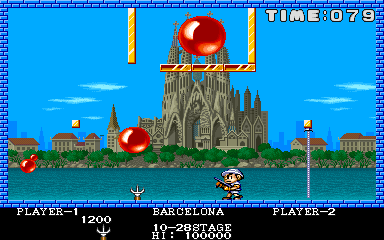
- Super Pang
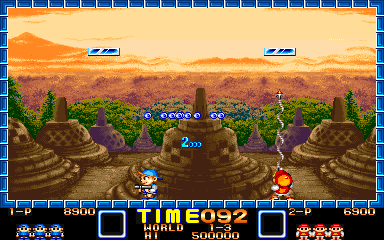
- Poker Ladies
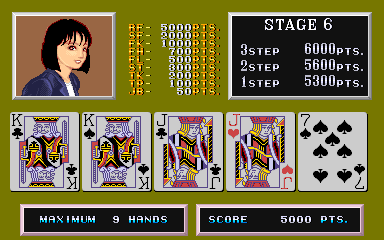
- Block Block
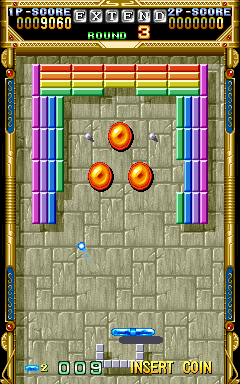
- Pang
- Added sound support to these games based on the nmk004 findings in mame: macross, black heart, bio ship paladin, strahl, acrobat mission, mustang, thunder dragon, and even hacha mecha fighter but this one is still totally unplayable.
For mustang, I switched to mustang original set instead of the bootleg version to avoid the infamous seibu sound system, so you'll have to update your romsets. Congratulations go to the mame team for that, everyone has been wondering how this sound emulation worked for YEARS !
- Fixed the file size recorded in the wav files, when recording raine_soud.wav, and the alignement byte which prevented the sound to play in the microsoft media player ! The wav file format is probably one of the stupidest file formats ever invented !
- add the ability to save screenshots in png (default now). You can set the compression level by editing the configuration file. Also you can now use a png file for the raine default background picture !
- Add a new command to save a "video", or more exactly a sequence of screenshots (preferably in png), and at the same time a wav file. You will still need something like mplayer to merge everything together. See README.videos in the docs directory for the details.
- fixed sound not starting when loading a saved game before qsound has been initalised in the capcom games (also fix a few stupid bank switches here and there).
- When choosing the best video resolution if all the available resolutions where too small, then you got a ridiculously small resolution. Now you get the bigest one.
- Added artwork bezel support - see README.bezels in the docs directory.
- Fixed bad sound in bjtwin and sabotenb, now there are no cracks any more.
- Fix a very old bug where the default directories for screen_dir (snapshots) and roms became "", translated to "/". I never noticed it because I always use the same config...
- Fix a 1 pixel alignement issue for the text layer in do donpachi (I never noticed it before because I usually don't have time to read the text in dodonpachi ! I finally saw it because I recorded a video in dodonpachi!).
- For windows choose a windowed default video mode to avoid any problem with weird setups which have vido sync problems. For the other OSes, choose a default resolution based on the video modes really available, take the 1st from 320x240.
- dx2 emudx file format : graphics for emudx are now stored in .dx2 files, which should be available from rainemu.com. These files are smaller than the original .dx files (and it's more convinient to work with these). The emudx files can now be placed either in the main raine directory for compatibility or in the emudx sub directory. .dx files are not supported anymore for the graphics.
- Added hammer music to donkey kong... It's generated from a midi file, oh well, if someone can do something better, let me know !
- Unix behaviour : a long time ago I accepted a patch to make raine to use a personnal dir, and a system wide dir for its files in linux, but I never took the time to test this since I have always used only 1 dir for raine. Well, it didn't work, raine always used one of these 2 instead of trying the personnal dir first and then the system wide directory. It's now fixed for raine.dat, hiscore.dat, history.dat, the snapshots, the language files, and the bezels.
- Aug 17 2005 - Raine makes videos !
At first I didn't want to add anything to produce videos since there are some free utilities in windows to record an avi of what you have on screen...
But now emulation takes a lot of resources and having something like this running in the background is probably not a very good idea for most setups.
Then I considered mng, but I wanted something that can be easily converted to any normal video format, and mng is not easy to convert (at least in linux).
So I finally added the ability to save screenshots at a chosen fps and in png format. So for example, you can save at 20 fps, with a compression level of 3 (this thing really kill cpu performance), to get this kind of video.
You need a decent video player to read it with the mpeg4 video codec, and it must know about variable bitrate mp3 for the audio.
So raine saves the pngs at the rate you chose, and produces raine_sound.wav at the same time. Then you put all this together with a video utility.
I used mplayer for this, which is free of course (and there is even a windows version now) !
- Aug 18 2005 - Bezel support!
It's not very usefull, but I have always hated these ugly black borders in vertical games... There are 2 solutions against these borders :
1) by a lcd flat screen... well I don't want to change my crt screen!
or 2) add bezel support to raine.
It takes the exact same artwork bezel files as mame of course.
And I am only interested in bezels for now...
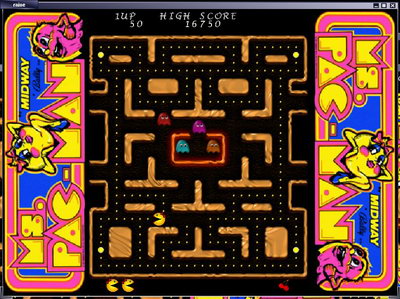
Here is what it looks like :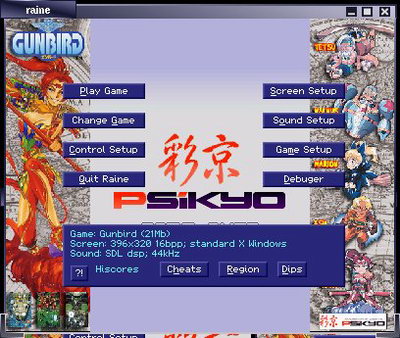
- Aug 19 2005 - Bezel + emudx
Bezels might not be very usefull, but they can be very nice, especially when combined with emudx support ! ;-)

Konami GB Collection: Vol.3
Игры Game Boy


» [SNES] Super Mario World - нужна помощь с графикой 21:25
» Картридж PS1 для PIO порта 21:24
» [GCN] GameCube — тест не- и малопопулярных игр 21:21
» Эротизм в играх 21:16
» RTHextion: новый hex-редактор для ромхакинга и переводов 21:11
» [SMD] Создание собственной многоигровки на одном чипе 20:59
» Playstation 1 без звука с Audio CD 20:11
» [3DO] Mortal Kombat II: 3DO Edition 20:04
» Picostation PS1 20:04
» Пройденные игры 19:45
» Не пройденные (заброшенные) игры 18:56
» [GBA] Sigma Star Saga 17:01
» Balloon Fight - 4 players hack 14:39
» Ретроигровые стримы и видео 2nd Channel 14:10
» [SNES] RoboCop Versus The Terminator / Stargate - поиск шрифта 13:12